hoo.be makes it easy to receive payments from your audience by connecting your Stripe account. Once enabled, fans can send you tips directly through your page.
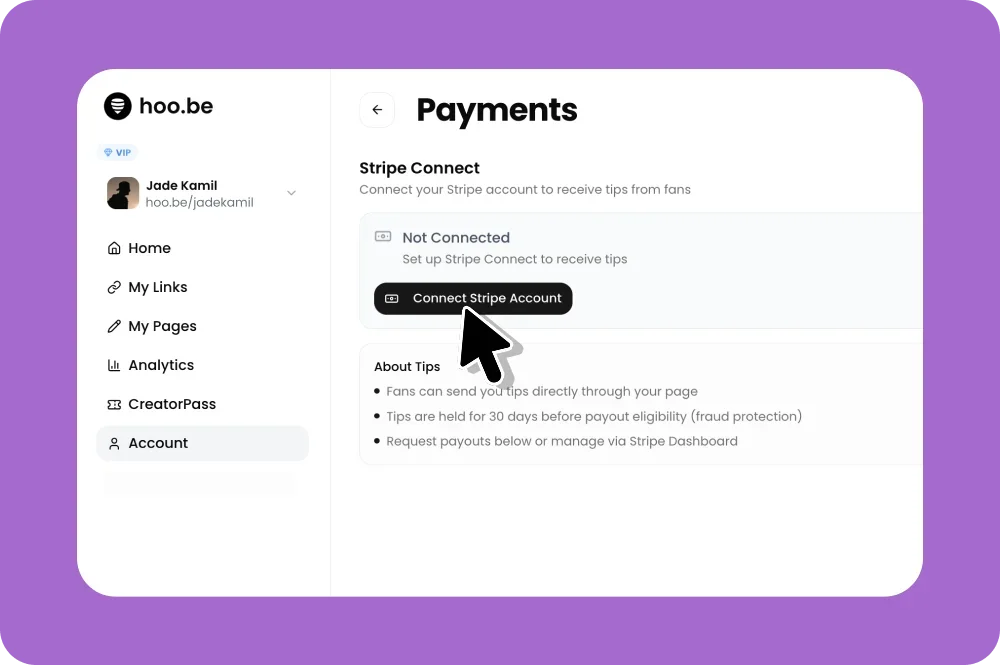
Enable Payments with Stripe
To start receiving payments:
Go to Account
Click Payments
Under Stripe Connect, click Connect Stripe Account
Follow the steps to connect an existing Stripe account or create a new one
Once connected, your account will be enabled to receive tips.
Add a Tips Block to Your Page
After payments are enabled, you can start collecting tips:
Open the page you want to edit
Click Add Block
Select Tips
Customize the title, success message, and layout
Save your changes
Your audience can now send tips directly from your hoo.be page.
How Payouts Work
Tips are sent directly to your connected Stripe account
Funds are held for 30 days before becoming eligible for payout (fraud protection)
You can manage payouts and payment details through the Stripe Dashboard