Easily share your hoo.be page across social platforms, messaging apps, and anywhere your audience can find you.
Your hoo.be page is designed to be shared. With just a few clicks, you can copy your link, add it directly to your social bios, or share it across your favorite platforms.
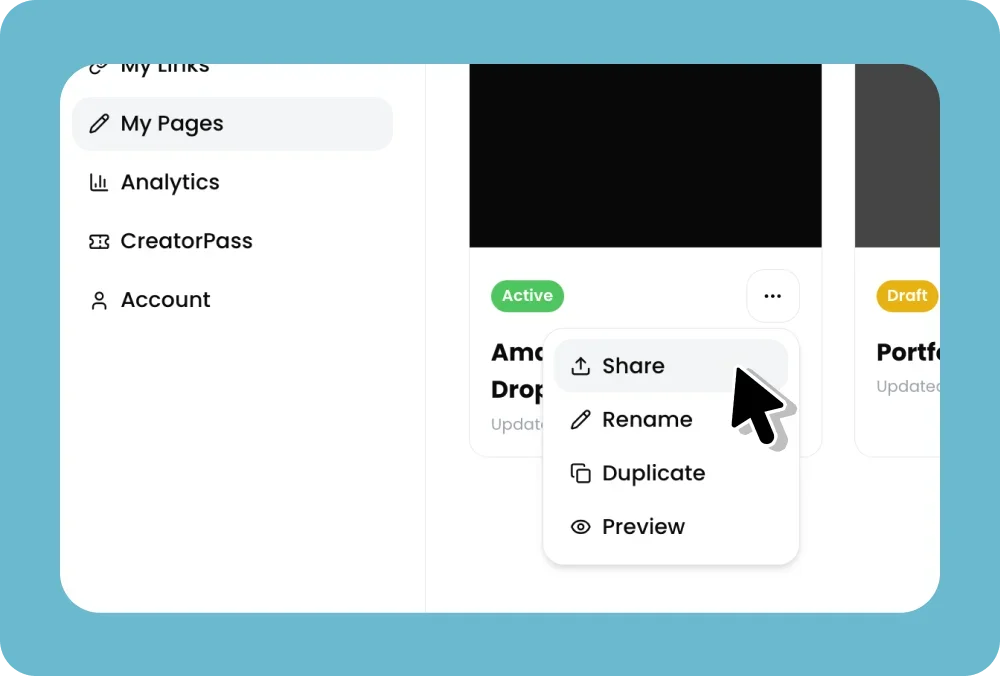
How to Share Your hoo.be Page
Log in to your hoo.be account.
Go to My Pages.
Click on the active page you want to share.
Click the three dots (•••) in the top corner.
Select Share.
From here, you have a few easy options.
Add Your hoo.be to Social Bios
Copy your hoo.be link to paste anywhere manually
Follow guided steps to add your hoo.be directly to platforms like:
Instagram
TikTok
YouTube
Snapchat
Facebook
X
Threads
LinkedIn
WhatsApp
This is the fastest way to replace your existing link-in-bio.
Share Your hoo.be Anywhere
You can also share your hoo.be link directly via:
Snapchat
Facebook
LinkedIn
X
WhatsApp
Messenger
Email
Or simply copy the link and paste it anywhere you want.
Pro Tip 💡
Add your hoo.be link to:
Social media bios
Pinned posts
Video descriptions
Email signatures
This ensures your audience can always find everything you’re sharing in one place.